How-to guides / Match your ingredients
Match your ingredients
Link each line of your recipe to an ingredient on your shelf. That is how Dough123 knows what each line is and what it costs.
-
1
See what needs matching
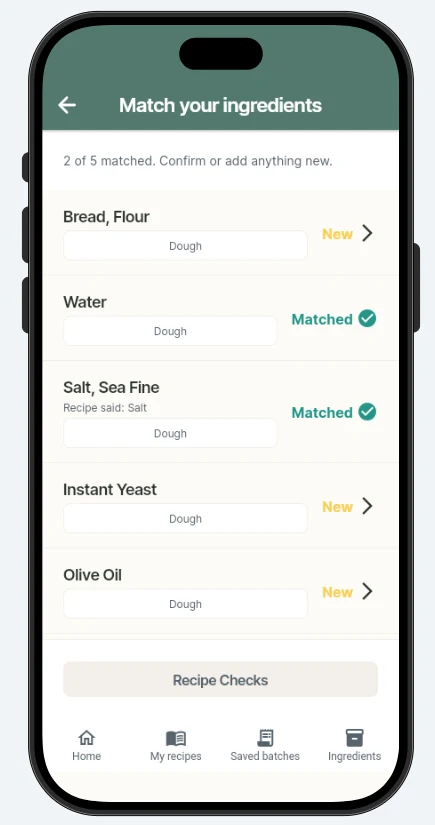
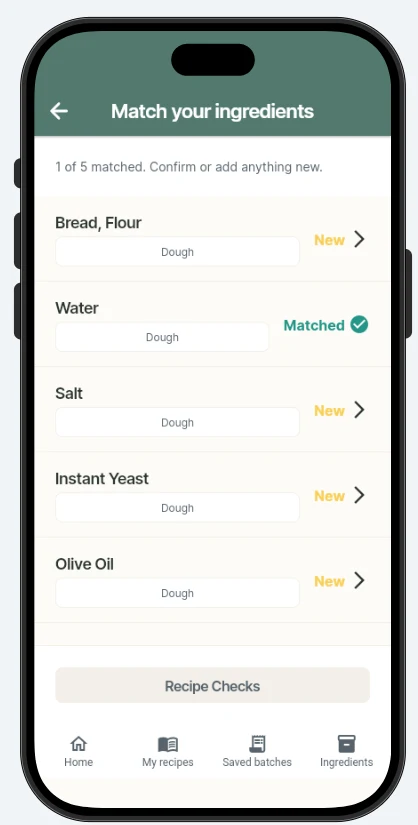
After you tap Looks Good, Continue, the Match Your Ingredients screen opens. The line at the top shows how many are done, like 1 of 5 matched. Confirm or add anything new.
Each line of your recipe shows:
- A box under the name: Flour, Dough or Topping.
- On the right, Matched in green with a tick, or New in yellow with an arrow.
A line spelled exactly like an ingredient on your shelf matches by itself. Capital letters count. Sample recipes come already matched.
-
2
Pick the one on your shelf
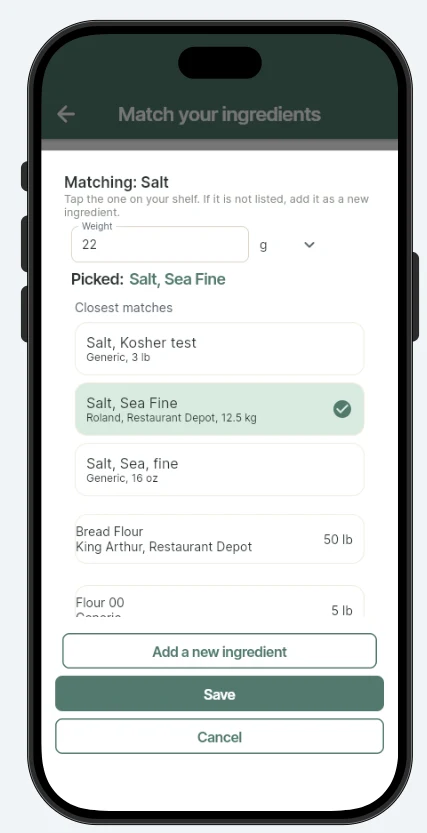
- Tap New on a line. A panel opens: Matching: and the line's name.
- Check the Weight box and the unit next to it (g, kg, oz or lb). Fix it if it's wrong.
- Under Closest matches, tap the ingredient you use. Picked: shows your choice.
Not in the closest three? Scroll down. Your whole ingredient list is underneath.
When several items match equally well, Closest matches shows dough ingredients first. Toppings come after.
-
3
Dough or topping?
Ingredients you use on top show a small Topping tag. For a dough line, pick one without the tag. Example: for the salt in the dough, pick your dough salt, not flaky sea salt.
Matching never moves a line. A dough line stays in the dough, even if you pick an ingredient with the Topping tag.
Toppings and add-ins have their own groups, lower down the screen. See Toppings and add-ins.
Why it matters: the bread checks for salt, water and yeast only count what is in the dough.

-
4
Not on your shelf yet?
Tap Add A New Ingredient. The ingredient form opens with the name filled in. Fill it in and tap Save Ingredient. Your new ingredient is picked for you.
Sold by volume, like oil or syrup (mL, L, fl oz, qt or gal)? Leave Net weight on the label empty and Dough123 uses the USDA weight list. A grey line under the price says Weight from USDA list: and the item it used. Not on the list? It says No price yet - not on our weight list. Type the Net weight on the label to price it. A weight you type always wins.
Sold as one item, like a #10 can? Pick each as the Unit. Words like #10 can in Package size count as 1.
-
5
Save each line, then go on
- Tap Save. It stays pale until you have picked an ingredient and the Weight box has a number.
- The line now shows Matched and your ingredient's name. What the recipe said shows underneath as Recipe said:.
- Do the same for every New line. Tap Matched on any line to change it.
- When every line is matched, Recipe Checks at the bottom turns green. Tap it. Your recipe is saved to My Recipes and Recipe Checks opens.
Cancel closes the panel without changing the line.