How-to guides / Your plan
Your plan
See whether you are on Free or Pro, upgrade, manage your subscription, or restore a purchase.
-
1
See your plan
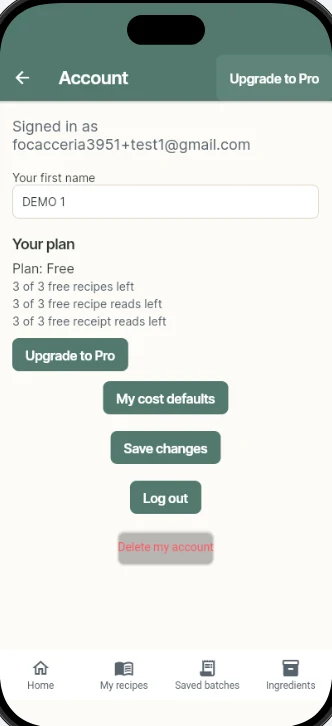
Tap the person icon at the top of Home. Account opens.
Look under Your plan. It says Plan: Free or Plan: Pro.
- On Free you see how many free recipes and reads you have left, like 2 of 3 free recipes left.
- On Pro you see Paid through and a date, and your reads left, like 48 of 50 recipe reads left. It also says when you get more.
-
2
Open Upgrade
On Free, tap Upgrade To Pro on Account. The Upgrade screen opens.
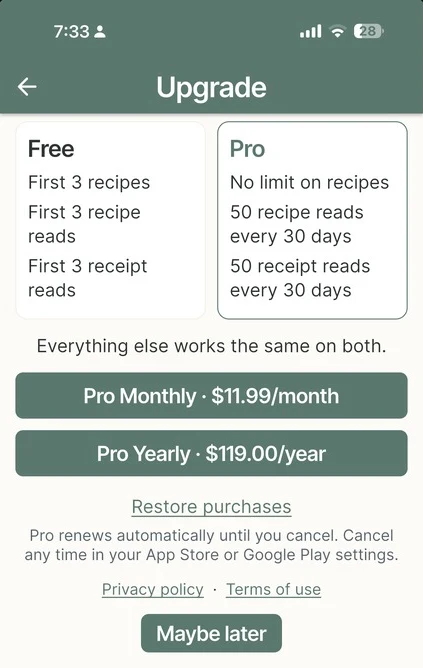
It shows Free and Pro side by side:
- Free: first 3 recipes, first 3 recipe reads, first 3 receipt reads.
- Pro: no limit on recipes, 50 recipe reads and 50 receipt reads every 30 days.
Everything else works the same on both.
When you run out of free recipes or reads, the app shows Upgrade To Pro right there. Tapping it opens the same screen.
-
3
Pick monthly or yearly
- Tap Pro Monthly ($11.99 a month) or Pro Yearly ($119.00 a year).
- The App Store or Google Play asks you to confirm. Confirm there.
- The app goes back to where you were and says You're on Pro now.
If it says Payment didn't go through. Try again., Pro did not switch on. Try again.
Changed your mind? Tap Maybe Later.
No buttons, and it says Plans can't load. Check your signal and try again.? Check your signal and open Upgrade again.
-
4
Manage or cancel your subscription
Open Account. Under Your plan, tap Manage Subscription.
It opens your subscriptions in the App Store or Google Play. Change or cancel Pro there.
Pro renews by itself until you cancel. After you cancel, Pro keeps working until the Paid through date.
If Pro ends and you have more than 3 recipes, Account says which 3 work on Free. Pick them in My Recipes.
-
5
Restore Purchases
Pro belongs to your Dough123 login. Log in on a new phone and it is there.
Paid, but Account still says Plan: Free?
- On Account, tap Upgrade To Pro.
- On Upgrade, tap Restore Purchases under the two Pro buttons.
It says Pro restored. and goes back. Or it says No Pro purchase found on this account.
Use the same App Store or Google Play account you paid with.